
How Everyday Professionals Are Using AI Tools to Save Time
Artificial Intelligence (AI) is no longer something used only by programmers, researchers, or large technology companies. Today, everyday professionals are using AI tools to handle small tasks that would otherwise take several minutes or even hours.
From summarizing long meeting notes to preparing email drafts and organizing a busy week, AI can work as a practical daily assistant. The biggest advantage is that you don’t need to know how to code to get started.
For students, office workers, freelancers, content creators and small-business owners, the right AI tools can help reduce repetitive work and leave more time for important tasks.
1. Summarizing Long Emails and Meeting Notes
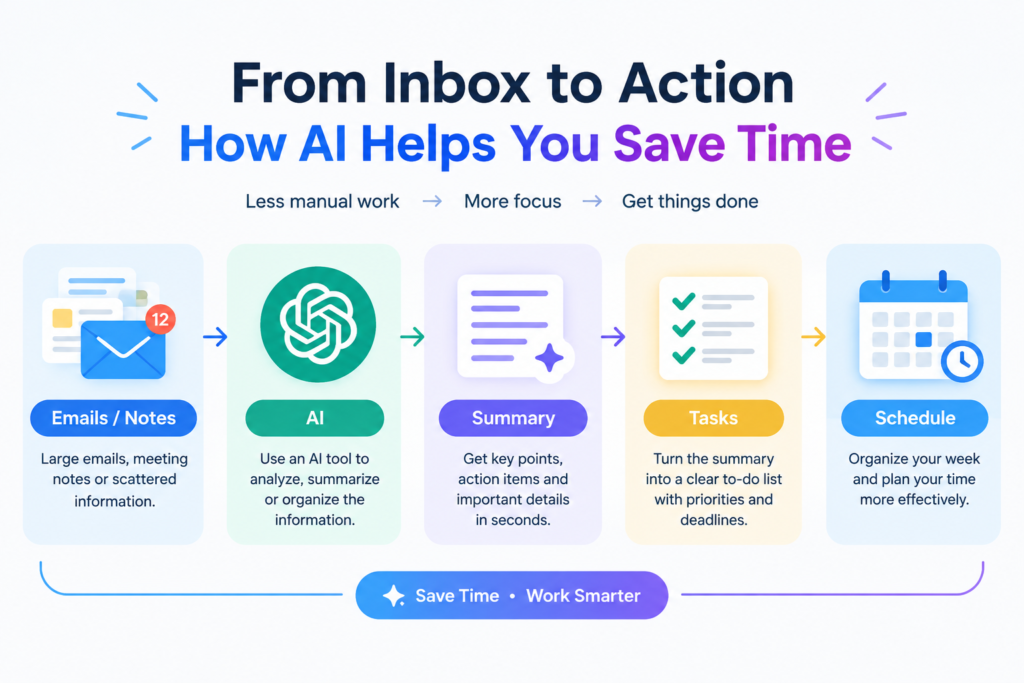
One of the simplest ways professionals use AI is to turn large amounts of text into short, useful summaries.
Imagine receiving a long email thread with several replies, decisions and action points. Instead of reading everything repeatedly, you can provide the text to an AI tool and ask it to identify:
The main points
Important decisions
Tasks that need to be completed
Deadlines
Questions that still need answers
The same approach can be useful for meeting notes. An AI assistant can organize unstructured notes into headings, bullet points and action items.
For example, you could ask:
“Summarize these meeting notes in five bullet points and list the tasks assigned to each person.”
This can make it easier to understand what actually needs to be done after a meeting.
Important: Always review AI-generated summaries against the original information, especially when the material involves business decisions or important details.
2. Drafting Quick Email Replies
Writing repetitive emails can consume a surprising amount of time during a working day.
AI can help create a first draft for common situations such as:
Replying to a customer
Confirming a meeting
Requesting additional information
Following up on an earlier message
Thanking someone for their help
Explaining a delay
Instead of asking AI to completely handle the communication, professionals can provide the basic information and ask for a concise draft.
For example:
“Write a polite and professional reply explaining that the project deadline needs to be moved by two days.”
The resulting draft can then be checked and edited before sending.
This approach keeps the human in control while reducing the time spent staring at a blank email window.
3. Organizing Weekly Schedules and To-Do Lists
AI can also help turn a messy collection of tasks into a more organized plan.
For example, someone might have:
A presentation to prepare
Three emails to answer
A project deadline on Friday
Two meetings
Personal errands
Several smaller tasks
Instead of trying to organize everything manually, they can ask an AI assistant to create a practical schedule.
A useful prompt could be:
“Organize these tasks into a realistic Monday-to-Friday schedule. Prioritize urgent work and leave some free time for unexpected tasks.”
AI can suggest an order based on deadlines and priorities. However, the user should make the final decision because AI does not necessarily know every personal or workplace constraint.
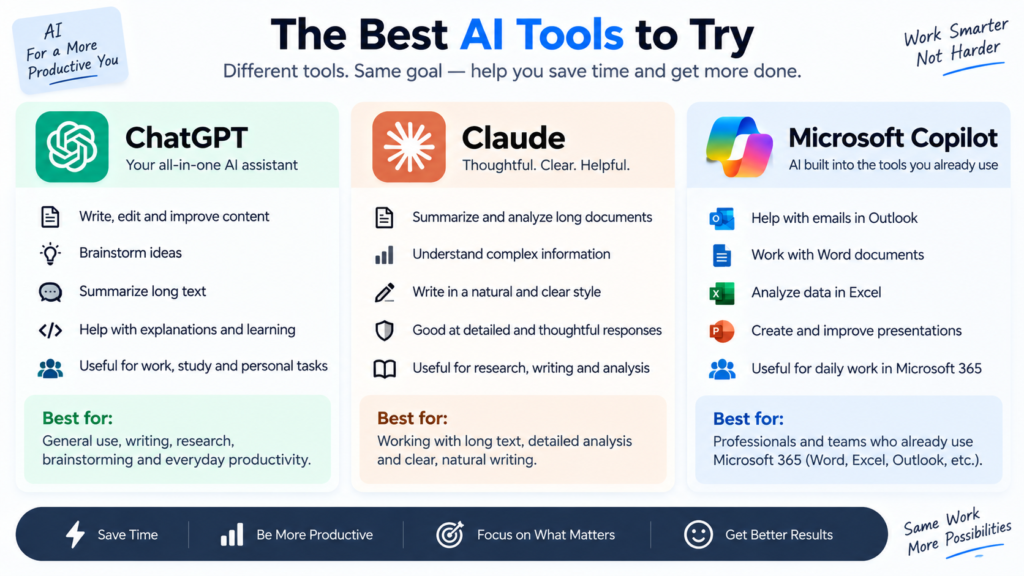
Best AI Tools to Try
Several popular AI assistants can help with everyday tasks without requiring programming knowledge.
ChatGPT
ChatGPT can help with writing, summarization, brainstorming, planning, rewriting, explanations and many other everyday tasks.
Professionals can use it as a general-purpose assistant for turning rough ideas into organized text or creating first drafts.
Chat GPT https://chatgpt.com/?utm_source=chatgpt.com
Claude
Claude is another AI assistant that can be useful for writing, analyzing information, summarizing documents and working with longer pieces of text.
It can be particularly useful when someone needs help understanding or restructuring a large amount of written information.
Claude https://claude.com/?utm_source=chatgpt.com
Microsoft Copilot
Microsoft Copilot can be useful for people already working within Microsoft’s ecosystem. Depending on the version and workplace setup, AI features can assist with tasks involving Microsoft’s productivity tools.
For professionals who spend much of their day working with documents, emails, spreadsheets or presentations, having AI integrated into familiar software can reduce the need to constantly switch between applications.
Microsoft Copilot https://copilot.com/?utm_source=chatgpt.com
Simple Rules for Using AI at Work
AI can save time, but using it responsibly is just as important as knowing how to use it.
Always Check Important Facts
AI systems can sometimes produce incorrect information or misunderstand a question.
Before using AI-generated information in an important email, report, presentation or business decision, verify the relevant facts.
Don’t Share Passwords or Secret Information
Never paste passwords, authentication codes, private keys or other highly sensitive information into an AI chatbot.
You should also be careful with confidential company information, private customer data and documents that you are not authorized to share.
Treat AI as an Assistant
AI is most useful when it helps you work faster rather than completely replacing your judgment.
Use it to create a first draft, organize information, summarize material or generate ideas. Then review the result yourself.
Give Clear Instructions
Better prompts usually produce better results.
Instead of:
“Write an email.”
Try:
“Write a short, polite email to a customer explaining that their order will arrive two days later than expected.”
Providing the audience, purpose, tone and important details gives the AI more useful context.
How AI Can Save Time Without Taking Over Your Work
The biggest benefit of everyday AI isn’t necessarily doing everything automatically. It is reducing the repetitive parts of work.
A professional might use AI to create a first draft, spend less time organizing notes and quickly turn a long document into a summary. They can then spend their saved time reviewing the work, making decisions and communicating with people.
This makes AI more like a digital assistant than a replacement for human judgment.
Conclusion
Artificial Intelligence is becoming a practical part of everyday work. You don’t need programming skills to benefit from it.
Whether you’re summarizing meeting notes, preparing an email reply or organizing your weekly tasks, tools such as ChatGPT, Claude and Microsoft Copilot can help reduce repetitive work and save time.
The key is to use AI thoughtfully: check important facts, protect private information and always review the final result yourself.
Which AI tool do you use the most, and what task does it help you complete faster?
You can also explore how people are using ChatGPT for creative tasks in our guide to the 1980s AI photo trend.https://itshk.in/1980s-ai-photo-trend-chatgpt/