Introduction
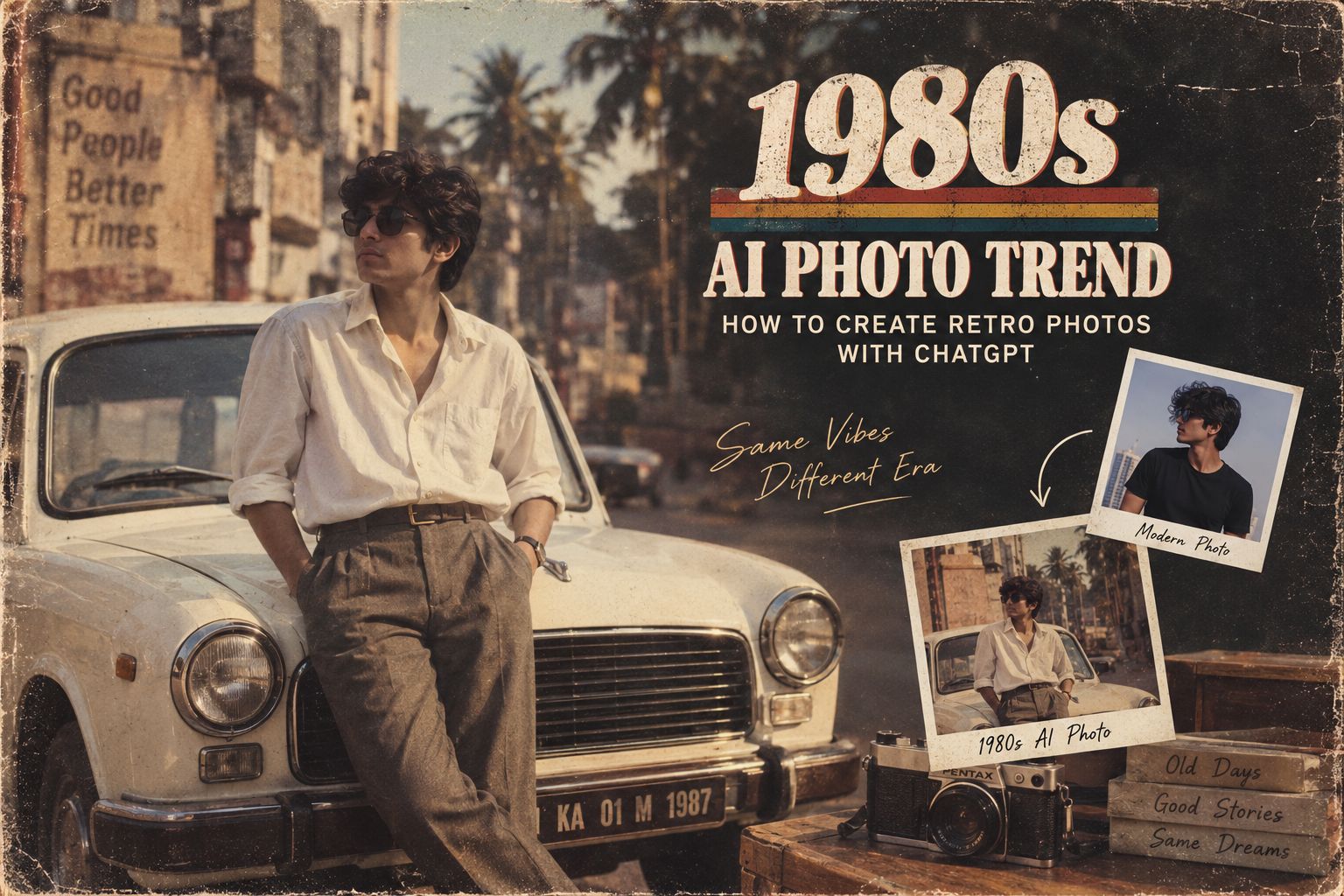
The 1980s AI photo trend is turning ordinary photos into retro-style portraits inspired by the fashion, colors and photography of the 1980s. The trend has become popular because AI tools can recreate the look of old photographs without needing professional editing software.
What makes this trend interesting is that you don’t need advanced photo-editing skills. With the right prompt and a suitable photo, you can ask ChatGPT to create a vintage-inspired version of your image in just a few steps.
In this guide, we’ll explain how to create the 1980s AI photo trend with ChatGPT, share practical prompts you can try, explain how to get more realistic results, and cover a few important things to consider before uploading a personal photo.
1. What Is the 1980s AI Photo Trend?
The 1980s AI photo trend is a popular style of AI image editing that transforms modern photographs into images inspired by the look of the 1980s.
Instead of simply adding an old-fashioned filter, AI can change several visual elements at once—such as clothing, hairstyle, lighting, background, colors and film texture—while keeping the person recognizable.
The result can look like a photograph taken in a vintage studio, an old family album, a retro Indian home, or even a classic 1980s street scene.
One reason the trend stands out is that the final image can feel more like a recreated photograph than a simple Instagram filter.
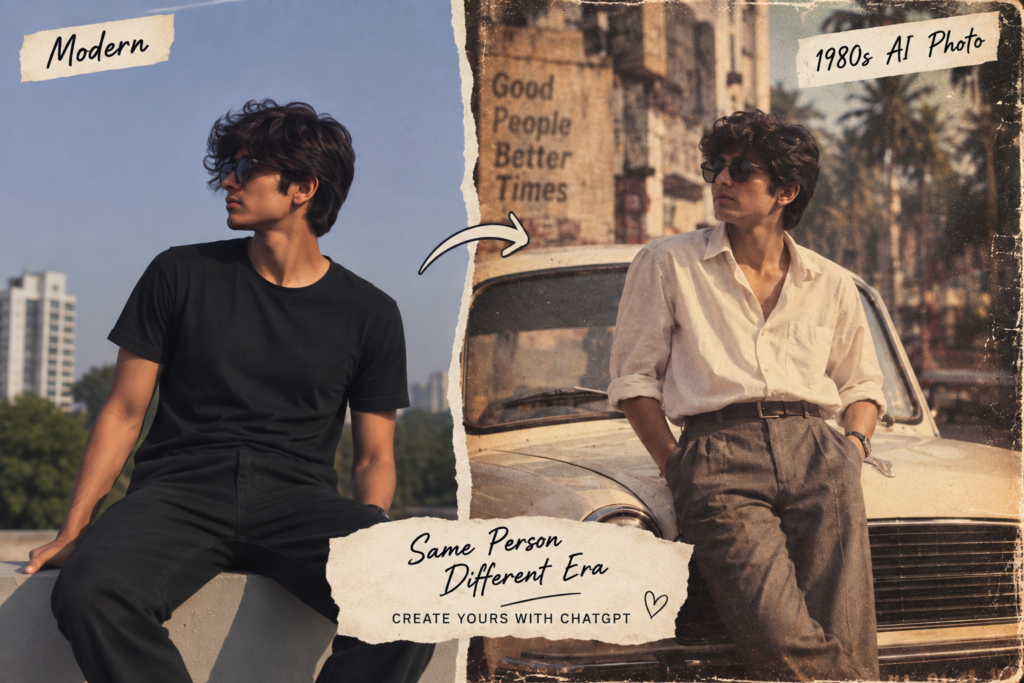
What can AI change?
Depending on the prompt, you can ask for:
1980s-style clothing
Vintage hairstyles
Retro Indian fashion
Film-camera grain
Warm or faded colors
Old-fashioned indoor or outdoor backgrounds
Period-appropriate lighting
Vintage photography imperfections
Important: AI-generated results won’t always be historically perfect. Small details such as clothing patterns, text, objects or backgrounds can sometimes look unrealistic, so it’s worth checking the finished image carefully.
2. How to Create the 1980s AI Photo Trend With ChatGPT
Creating a retro-style image with ChatGPT is simple. You don’t need professional editing software or advanced photography skills. You can start with a clear photo of yourself, a friend, or another subject and describe the 1980s look you want.
Step 1: Choose a Good Photo
Use a clear, well-lit photo where the person’s face is easy to see. A front-facing or slightly angled portrait usually gives AI more information to work with.
For better results:
Use a high-quality image.
Avoid heavily blurred photos.
Make sure the face isn’t covered.
Use a photo with reasonable lighting.
Avoid images with too many people if you want one specific person transformed.
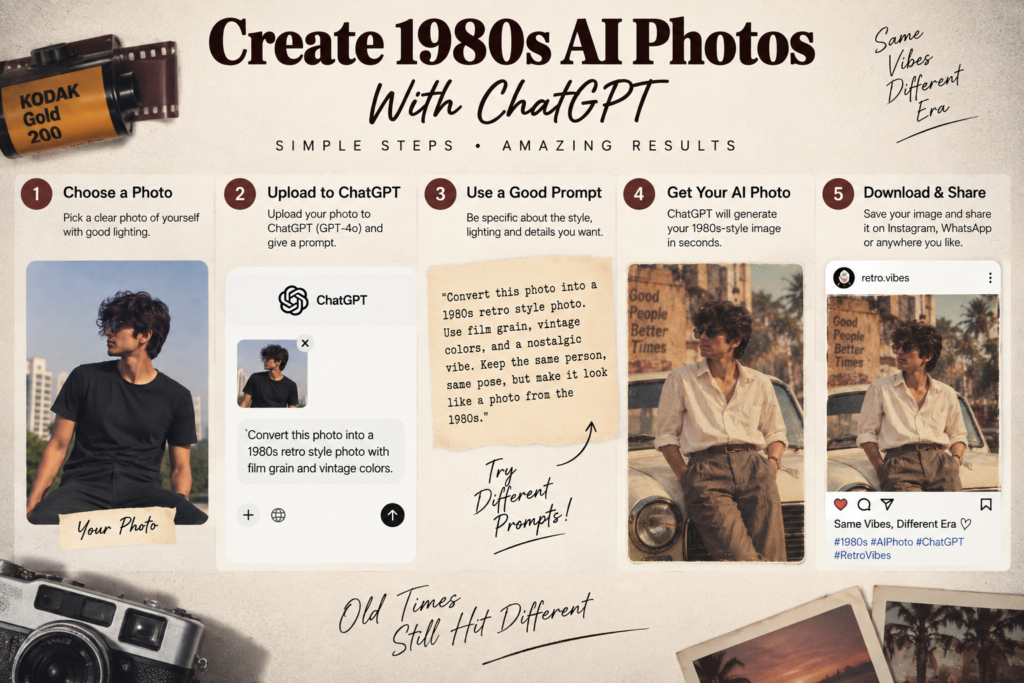
Step 2: Upload the Photo to ChatGPT
Open ChatGPT and upload your chosen photo. Then describe how you want the image transformed.
You don’t have to use complicated instructions. A detailed description of the era, clothing, setting, lighting and photography style usually gives you more control over the result.
Step 3: Try a Simple 1980s Prompt
You can start with this:
“Transform this photo into a realistic 1980s-style portrait. Keep the person’s facial features and identity recognizable. Give the image authentic 1980s clothing, hairstyle, warm vintage lighting, subtle film grain and the look of an old film-camera photograph. Keep the result natural and photorealistic.”
If the first result isn’t what you expected, don’t immediately start over. Tell ChatGPT what you want changed—for example, the clothing, background, lighting or amount of film grain.
Step 4: Make the Style More Specific
The biggest difference between an ordinary vintage filter and a convincing retro image is specificity.
For example, instead of simply saying “make it look old,” you can describe a particular setting:
“Place the person in a classic 1980s Indian living room, wearing period-appropriate clothing, with warm indoor lighting, an analog film-camera look, subtle grain and slightly faded colors. Keep the face natural and recognizable.”
This gives the AI more visual direction while leaving room for it to create the scene.
Step 5: Check the Final Image
Before sharing the result, look closely at the face, hands, clothing, background and any text in the image. AI-generated images can sometimes introduce unwanted changes or unrealistic details.
If something looks wrong, ask ChatGPT to correct that specific part rather than regenerating everything.
Pro tip: Save your original photo separately. That way, you can experiment with different retro styles without losing the original image.
3. Best 1980s AI Photo Prompts to Try
Now let’s make the article actually useful. Instead of giving you one generic prompt, we’ll give readers several styles they can copy and customize.
1. Classic 1980s Portrait
“Transform this photo into a realistic 1980s portrait. Keep the person’s facial features, face shape and natural expression recognizable. Add authentic 1980s clothing, hairstyle, warm studio lighting, subtle analog film grain, slightly faded colors and the texture of a vintage film photograph. Make it look like a real photograph from the 1980s, not a modern photo with a filter.”
2. 1980s Indian Retro Style 🇮🇳
“Turn this photo into a realistic 1980s Indian portrait. Keep the person’s face and identity recognizable. Use authentic Indian 1980s fashion, period-appropriate hairstyle and a simple vintage Indian home setting. Add warm lighting, natural skin texture, subtle film grain and slightly faded analog colors. Make the photograph feel authentic to the era.”
3. 1980s Street Photography
“Recreate this photo as an authentic 1980s street photograph. Keep the person recognizable while changing the clothing and surroundings to match the era. Use vintage cars, period-appropriate shops and street details, natural daylight, analog film grain and slightly muted colors. Make it look like it was captured on an actual 1980s film camera.”
4. 1980s Studio Photo
“Create a realistic 1980s studio portrait from this photo. Preserve the person’s recognizable facial features and natural expression. Add classic 1980s clothing, studio backdrop, soft flash photography, subtle film grain and authentic analog colors. Avoid a modern digital appearance.”
Tip: Tell ChatGPT exactly what you want to change. You can combine the clothing from one prompt with the background from another to create a completely different retro look.
4. How to Make Your 1980s AI Photos Look More Realistic
A good prompt is only part of the process. Small changes to your instructions can make the final image look much more natural.
Keep the Face Consistent
If you’re editing a portrait, clearly tell the AI to preserve the person’s recognizable facial features. This helps avoid unnecessary changes to the face.
Describe the Era
Don’t just write “make it vintage.” Mention details that belong to the 1980s, such as clothing, hairstyles, furniture, cameras and surroundings.
Don’t Overdo the Effects
Too much film grain, blur or faded color can make the image look artificial. Ask for subtle grain and natural lighting rather than extreme effects.
Use a Suitable Original Photo
A clear, well-lit source image generally gives AI more information to work with. Very blurry or heavily edited photos can produce less consistent results.
Correct Problems With Follow-Up Instructions
If something looks wrong, be specific:
“Keep the face unchanged, but make the hairstyle more appropriate for the 1980s and reduce the film grain.”
This is often better than changing the entire prompt.
Try Different Versions
Don’t expect the first generation to be perfect. Try a few variations by changing the background, clothing, lighting or camera style until you find a result you like.
Remember: The goal isn’t to add as many vintage effects as possible. The best result is one that looks like a genuine photograph from the 1980s.
5. 5 Retro Styles You Can Create With AI
The 1980s had many different visual styles, so you don’t have to stick to one type of portrait. Try different settings depending on the mood you want.
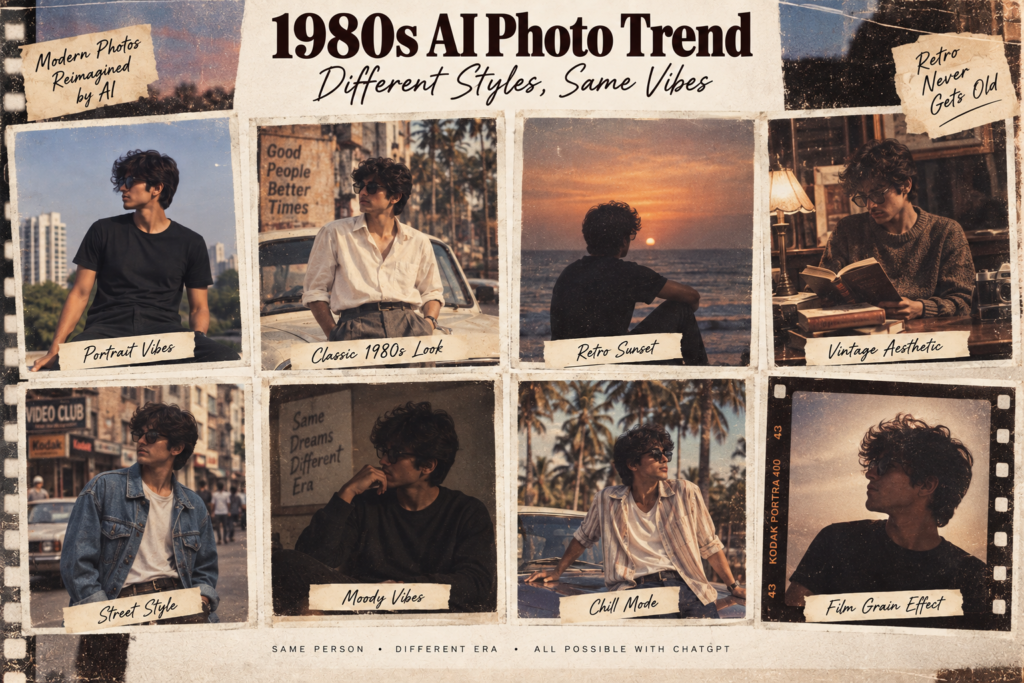
1. Classic Family Album 📸
Create a warm family-photo look with simple clothing, an indoor home setting and slightly faded film colors.
2. Retro College Look 🎓
Use 1980s-inspired casual clothing, hairstyles and a simple college or street background.
3. Vintage Bollywood-Inspired Look 🎬
Ask for colorful period-appropriate Indian fashion, dramatic studio lighting and an old-film photography feel.
4. Old-School Street Look 🚗
Place the subject on an authentic-looking 1980s street with period vehicles, shops and clothing.
5. Retro Studio Portrait ✨
Use a simple backdrop, soft flash, classic clothing and subtle analog film grain for a traditional studio-photo appearance.
💡 Tip: Don’t ask AI to add every possible retro element at once. Pick one style and describe it clearly. This usually gives you a more believable result.
6. Common Problems With the 1980s AI Photo Trend and How to Fix Them
While creating images with the 1980s AI photo trend, you may not always get the result you expect. AI can sometimes change facial details, create unrealistic objects or make the image look overly edited.
Here are some common problems and simple ways to improve the result.
The Face Looks Different
If the generated person doesn’t look enough like the original, ask ChatGPT to preserve the facial structure, expression and recognizable features.
The Image Looks Too Artificial
Avoid asking for extreme effects. Try instructions such as:
“Keep the image photorealistic with subtle film grain and natural skin texture.”
Clothing Doesn’t Look Authentic
Be more specific about the period. Instead of saying “old clothes,” mention 1980s Indian fashion, hairstyles and accessories or the particular style you’re trying to recreate.
Background Has Strange Details
AI can sometimes create unusual signs, objects or distorted backgrounds. Ask it to use a simple, realistic background and avoid unnecessary text or complicated objects.
Too Much Grain or Blur
Vintage photographs can have grain, but excessive grain can make the image look fake. Ask for subtle analog film texture rather than heavy noise.
The Result Doesn’t Match Your Idea
Don’t completely rewrite the prompt every time. Give ChatGPT a follow-up instruction explaining exactly what needs changing.
For example:
“Keep the same person and composition, but make the clothing and background more authentic to the 1980s and reduce the vintage effect.”
With a few small adjustments, you can usually get a much better result from the 1980s AI photo trend.
7. Is It Safe to Upload Photos to AI Tools?
Before joining the 1980s AI photo trend, it’s worth thinking about what happens when you upload a personal photo to an AI service.
AI image tools may process uploaded images on their servers, so you should understand the service’s privacy practices before sharing anything sensitive.
Keep These Tips in Mind
Avoid uploading sensitive documents such as IDs, passports or certificates.
Be careful with photos containing private information in the background.
If you’re uploading someone else’s photo, make sure you have their permission.
Use the official AI service or app rather than unknown websites promising free image generation.
Check the service’s privacy policy to understand how uploaded images may be stored or used.
If you don’t need a highly detailed image, consider using a photo that reveals less personal information.
For a simple 1980s AI photo trend image, you generally don’t need to include personal details beyond the subject you want to transform.
Privacy tip: Before uploading a photo, take a quick look at the background. A house number, phone screen, address, school ID or other private information can easily appear in an otherwise ordinary photograph.
8. How to Make Your 1980s AI Photos Look Good on Instagram
If you’re creating an image for Instagram, the way you frame and prepare it can make a big difference. A good 1980s AI photo trend image should look clean and natural rather than overloaded with effects.
Choose the Right Composition
For a profile picture or portrait post, keep the subject clearly visible and avoid placing important facial details too close to the edges.
Use a Portrait-Friendly Format
A vertical image generally works well for Instagram posts and Stories. If your AI tool produces a different aspect ratio, you can crop the image before posting.
Keep the Retro Effect Subtle
Strong grain, extreme fading or excessive blur can make the image look artificial. A little film texture can be enough to create the vintage feeling.
Check the Image Before Posting
Zoom in and look for unusual fingers, facial changes, distorted objects or strange text. AI-generated images can occasionally contain small visual errors.
Add a Simple Caption
You don’t need a long caption. Something like:
“A little trip back to the 1980s 📸✨”
can work well with a retro portrait.
Pro tip: Generate a few variations of your 1980s AI photo trend image and choose the one that looks most natural rather than automatically using the first result.
9. How to Get Better Results From the 1980s AI Photo Trend
The quality of your result often depends on how clearly you describe the image you want. A simple prompt can work, but adding a few specific details can make your 1980s AI photo trend results more convincing.
Describe the Clothing
Instead of saying “add vintage clothes,” describe the type of outfit you want.
For example:
“Give the person authentic 1980s Indian casual clothing with period-appropriate colors and styling.”
Mention the Photography Style
You can specify how you want the photograph to look:
Analog film photography
Soft flash
Slightly faded colors
Natural skin texture
Subtle film grain
Mild lens imperfections
Describe the Background
A specific setting can make the image feel more connected to the era.
For example:
“Place the person in a simple 1980s Indian living room with period-appropriate furniture and warm indoor lighting.”
Tell AI What NOT to Change
This is especially useful for portraits. You can say:
“Keep the person’s face, facial proportions and natural expression recognizable. Change only the clothing, background and photography style.”
Use Follow-Up Prompts
You don’t have to get everything perfect in one request. If the first result is close but not quite right, give a short correction.
For example:
“Keep the same image, but make the colors less saturated and reduce the film grain.”
This approach lets you fine-tune the 1980s AI photo trend result without completely changing the original idea.
Don’t Add Too Many Instructions
More details aren’t always better. Focus on the subject, era, clothing, background and photography style you actually want. This gives the AI a clear direction without making the prompt unnecessarily complicated.
10. Best 1980s AI Photo Prompts for Different Styles
Want to experiment beyond a basic vintage portrait? These prompts can help you create different versions of the 1980s AI photo trend. Upload your photo to ChatGPT, copy a prompt, and adjust the details to match your idea.
👨👩👧 1. Retro Family Photograph
“Transform this photo into a realistic 1980s family photograph. Preserve the recognizable faces and natural expressions. Give everyone authentic 1980s clothing and place them in a simple period-appropriate home setting. Use warm indoor lighting, subtle analog film grain and slightly faded colors. Make it look like a genuine family photo taken on a film camera.”
❤️ 2. 1980s Couple Portrait
“Turn this photo into a realistic 1980s couple portrait. Keep both people recognizable and preserve their natural facial features. Add authentic 1980s fashion, a simple romantic background and soft film-camera lighting. Use natural skin texture, subtle grain and slightly muted colors.”
🛵 3. Retro Indian Street Scene
“Recreate this photo as an authentic 1980s Indian street photograph. Keep the person recognizable and use period-appropriate Indian clothing, vehicles, shops and surroundings. Add natural daylight, realistic analog film grain and slightly faded colors. Avoid modern objects and make the scene photorealistic.”
🎬 4. Cinematic 1980s Portrait
“Create a cinematic 1980s-inspired portrait from this photo while keeping the person’s identity recognizable. Use period-appropriate clothing, dramatic but realistic lighting, subtle analog film texture and a classic film-camera look. Keep the skin and facial details natural rather than overly processed.”
📷 5. Old Photo Album Style
“Transform this image into a realistic photograph that looks like it came from a personal photo album from the 1980s. Preserve the person’s recognizable appearance, use authentic period clothing and surroundings, and add subtle film grain, natural imperfections and gently faded analog colors.”
💡 Tip: You can combine ideas from different prompts. For example, use the Indian street setting from one prompt with the cinematic lighting from another. This makes it easier to create a style that feels personal rather than identical to everyone else’s AI images.
11. Are 1980s AI Photos Real or AI-Generated?
The 1980s AI photo trend creates images that can look surprisingly similar to real photographs from the past. However, the finished image is still AI-generated or AI-edited, even when it has realistic film grain, lighting and vintage details.
AI can recreate the visual characteristics of older photography, but it cannot turn a modern photograph into an actual historical photograph.
How to Tell the Difference
When looking at an AI-generated retro image, check for:
Unusual fingers or hands
Distorted text or signs
Strange objects in the background
Facial details that change unexpectedly
Clothing or objects that don’t fit the period
Unnatural reflections or shadows
These aren’t always present, but they can be clues that an image was generated or heavily edited.
Should You Tell People It’s AI?
If you’re posting the image online, it’s a good idea to be transparent that it’s AI-generated or AI-edited, especially if someone could reasonably mistake it for a genuine historical photograph.
The 1980s AI photo trend is best treated as a creative way to imagine what a modern photo might look like in a different era—not as a way to recreate genuine historical evidence.
12. How to Make the 1980s AI Photo Trend Look Natural
The best 1980s AI photo trend results usually don’t rely on extreme effects. A few carefully chosen details can make the image feel much more believable.
Avoid Excessive Vintage Effects
Heavy grain, strong blur and extreme color fading can make the image look like an obvious filter. Ask for a subtle analog film texture instead.
Keep Skin Texture Natural
If the face looks overly smooth or plastic, add an instruction such as:
“Keep realistic skin texture and natural facial details. Avoid excessive skin smoothing.”
Use Period-Appropriate Details
Modern objects can make a supposedly 1980s photograph look less convincing. Ask the AI to remove or replace obvious modern elements such as smartphones, modern cars or contemporary clothing.
Don’t Change Everything
If you want a believable transformation, keep some aspects of the original photograph—such as the person’s expression and pose—while changing the elements that establish the era.
Compare Different Versions
Generate a few variations and compare them. The most realistic version may not be the most dramatic one.
The goal of the 1980s AI photo trend isn’t to make the image look extremely old. It’s to make a modern photograph feel as though it could have been captured during that era.
13. Frequently Asked Questions About the 1980s AI Photo Trend
Can I create the 1980s AI photo trend with ChatGPT?
Yes. You can upload a suitable photo and describe the 1980s style you want. More specific instructions about clothing, lighting, background and film texture can help produce better results.
What kind of photo works best?
A clear, well-lit photo with the person’s face visible usually works best. Avoid heavily blurred or extremely dark images.
Can I create an old Indian-style photo?
Yes. You can specifically request 1980s Indian fashion, hairstyles, interiors, streets and photography styles to create a more regionally appropriate result.
Why does AI sometimes change my face?
AI image generation can alter facial details during editing. Tell it to preserve the person’s recognizable facial features, face shape and natural expression, then use a follow-up prompt if further correction is needed.
Can I use these images on Instagram?
Yes, you can share AI-generated images on social platforms, but it’s a good idea to make it clear that the image is AI-generated or AI-edited when viewers could mistake it for a real historical photograph.
Why does my image look too artificial?
Try reducing excessive grain, blur and color effects. Asking for natural skin texture, realistic lighting and subtle analog film grain can make the result more believable.
Is the 1980s AI photo trend an actual historical photograph?
No. These images are AI-generated or AI-edited recreations. They should not be presented as genuine photographs from the 1980s.
Can I create different retro styles from the same photo?
Absolutely. You can experiment with family portraits, Indian street scenes, studio photography, college-style portraits and cinematic looks using the same original image.
Conclusion
The 1980s AI photo trend is a fun way to experiment with AI image generation and give modern photographs a completely different look. With a clear source photo and a detailed prompt, you can recreate the fashion, atmosphere and photography style associated with the 1980s.
The key is to avoid overdoing the effects. Focus on realistic clothing, suitable backgrounds, natural lighting and subtle film texture. If the first result isn’t perfect, use follow-up instructions to correct specific details instead of starting from scratch.
Whether you want a retro family portrait, an old-school Indian street scene or a cinematic vintage photograph, experimenting with different prompts can help you find a style that works for you.
If you’re trying the 1980s AI photo trend, start with a simple prompt and build from there. The best results often come from a few thoughtful changes rather than dozens of effects. 📸✨
You can upload your image directly to ChatGPT and describe the retro style you want. https://chatgpt.com/?utm_source=chatgpt.com
Before uploading a personal photo, review the AI service’s privacy information and avoid including sensitive details. https://openai.com/policies/row-privacy-policy/
If you’re also interested in mobile gaming, check out our guide on how to fix Free Fire lag and high ping on Android.https://itshk.in/free-fire-lag-high-ping-android/